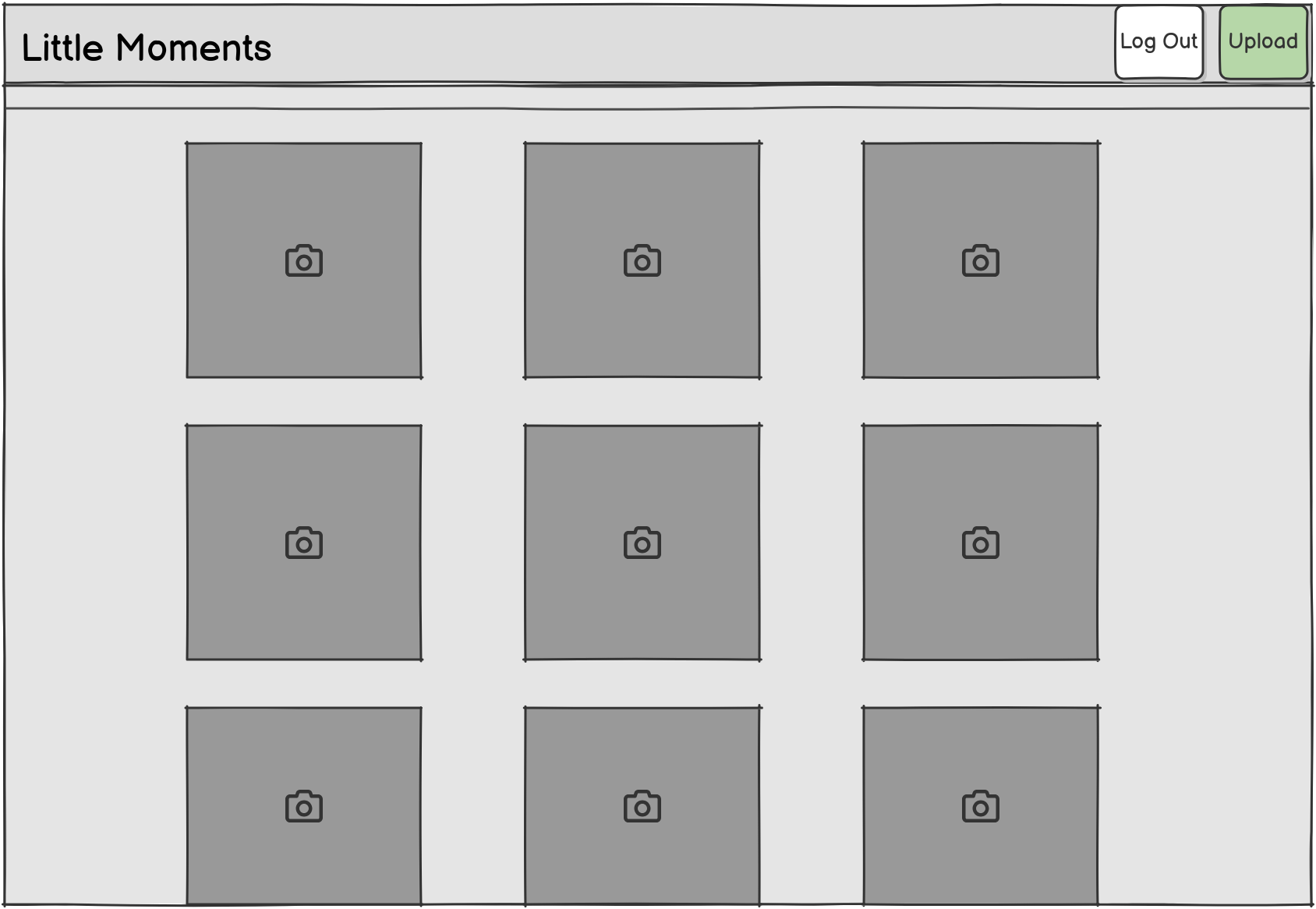
Create a web app that allows parents to share photos and videos of their children with close friends and family members.
The photos show as a grid of square thumbnails flowing left to right, top to bottom.
There is no pagination. The page loads all thumbnails on the initial page load, though images are lazy-loaded to avoid downloading all thumbnails immediately.
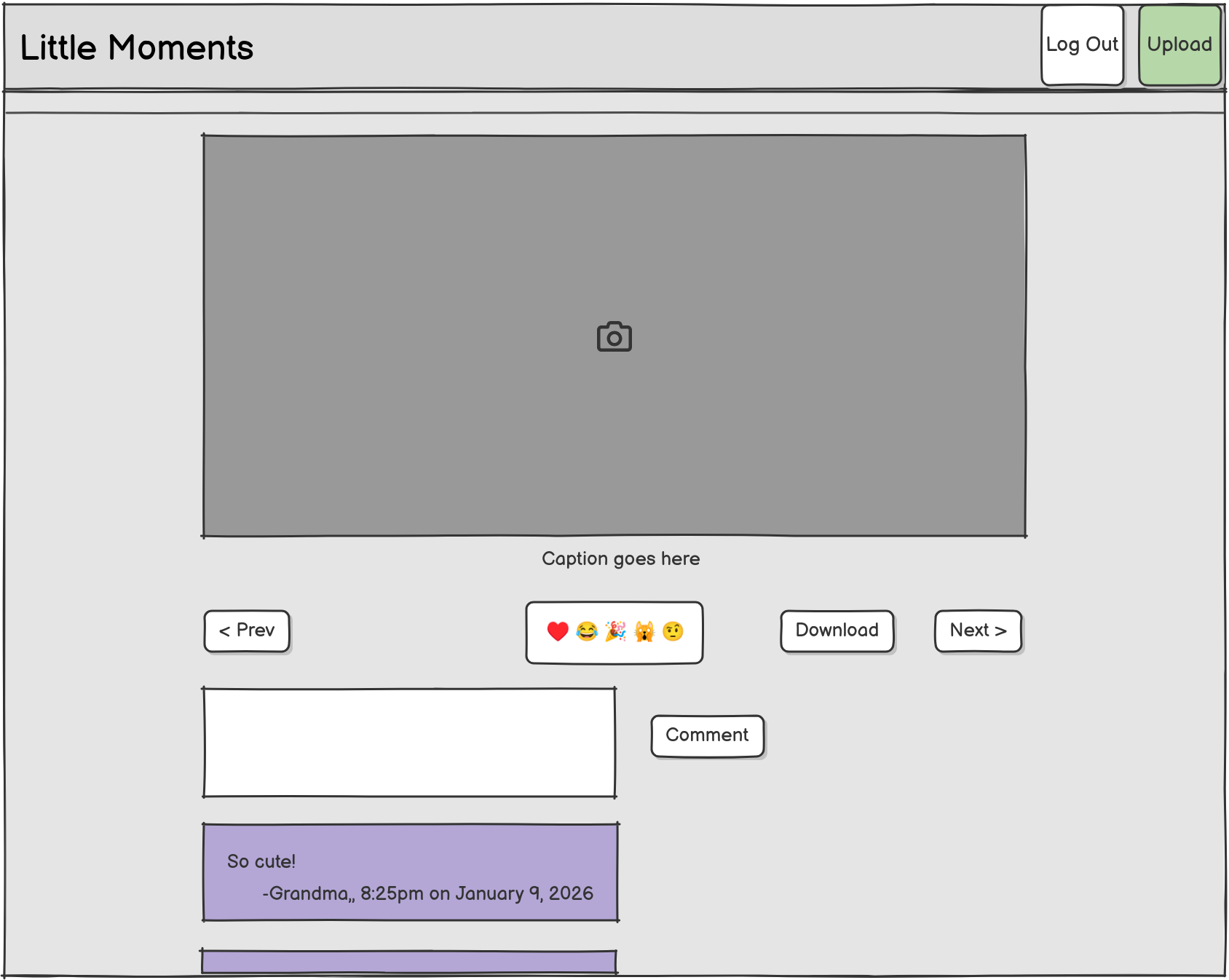
On mobile, the user can swipe left and right to view the previous and next photo, respectively.
On desktop, the user can click next or previous to get to the next photo.
All users can download the photo at full resolution.
For owners, the home page has an upload button that is the main call-to-action on the screen. The “Upload” button should always be visible in the navbar on both desktop and mobile views. On mobile, even when the navbar is collapsed, the “Upload” button should still be visible outside of any tap-to-expand area.
After the user uploads a photo, they have the option to either add a caption or publish the photo without a caption. When the user publishes the photo, it’s visible to other users and queued for mention in the next email announcement.
All users can add comments to a post. The comments may include text and emoji.
The app does not have comment subthreads, so all comments are at the same level.
The app does not maintain a comment history (see Data retention).
The user who added the comment can edit or delete their comments. Owners can edit or delete any comment.
The user can post a comment or react with one of these emoji: ♥️ 😂 🎉 🙀 🤨
Users can only add a single reaction to each media item.
Emoji reactions appear directly below the image, one per line of:
<emoji> <username>, <relative time>For example:
😂 michael, 2 weeks agoThe user who added the comment can edit or delete their reactions. Owners can edit or delete any reaction.
Little Moments uses data from tinybeans-export to populate the initial set of data (see appendix). A parent would only do this once when initially setting up their Little Moments server. This is an operation that happens before the server is live and serving user requests.
tinybeans-export on their current TinyBeans
account../dev-scripts/import-from-tinybeans that translates the
data to Little Moments and populates the local data store.
import-from-tinybeans requires the
local data store to be empty.tinybeans-export data to the Little Moments app as
registered users
MOTHER or FATHER
in tinybeans-export have parent access by default (see User permissions).tinybeans-export data can access Little
Moments without having to sign up with Little Moments beyond requesting
a magic login link.Little Moments’ data model is simpler than TinyBeans, so the importer will simplify some TinyBeans data to fit Little Moments. In particular:
user.emailOptOut is true (they’ve opted
out globally) ORuser.emailFrequencyOnNewComment.name is
NONE AND user.emailFrequencyOnNewEmotion.name
is NONE and emailFrequencyOnNewEvent is
NONE (they’ve opted out of all other types of emails)For simplicity, I’m deliberately omitting these features from the v1 implementation:
noreply@ email
address.Assumptions I’m making about Little Moments users:
There are two permission levels for app users:
My wife and I will each have Owner permissions. Everyone else we invite will have Subscriber permissions.
Photos and videos do not have fine-grained permission levels. All photos are visible to all users.
Comments do not have fine-grained permission levels. All comments are visible to all users.
By default, users receive daily email notifications when there is new activity on Little Moments. The app sends summary emails out every day at 9 AM ET.
All notification emails contain a one-click unsubscribe link. Users do not need to sign in to unsubscribe from email updates.
The app also has a user preferences page that allows the user to disable email notifications.
The notification email summarizes all user activity in the last day that’s relevant to the recipient.
Notifications to parents (owners) summarize all activity, including:
Notifications to subscribers (non-parents) are limited to:
Photo/video thumbnails are included from earliest to latest by upload time. Clicking a photo leads to the page on Little Moments.
Thumbnails are embedded images and not email attachments. They point to S3-style URLs that do not expire.
The app does not send users notification emails when there is no new activity to report to them.
Hi Ned,

Here are today's Little Moments updates:

Marge added a new photo

<photo 1 thumbnail>

Homer added a new video

- Uncey Herb: What a sharp outfit!
- 🤨 Patty

<video 1 thumbnail>

There was new activity on this upload from June 3rd:

<photo 2 thumbnail>

- Grandma: He gets cuter every day
- Grandpa: I agree!
- 😂 Moe
- ♥️ Maude

There was new activity on this upload from June 8th:

<video 2 thumbnail>

- Maude: How precious!
- ♥️ MaudeTarget: 99% availability (two nines)
This allows up to 3.65 days of outages per year.
This is not a critical app that must be online at all times, but it should be online enough that family members can rely on it to view photos.
All thumbnails within the viewport should load in under 400ms on a desktop with a 1 Gbps network connection.
The app should support up to 50 users with up to 15 users accessing the site simultaneously.
It likely can scale higher, but this is all it needs to achieve for the audience I expect.
The app supports photos up to 50 Megapixels and up to 50 MB each.
The app supports videos up to 8K resolution, up to 5 GB in size, and up to 30 minutes of duration.

Go is the language I’m most comfortable in, and I find it especially good for writing backend-heavy web apps.
I’ve tried several frontend frameworks, but I work better in plain HTML, JavaScript, and CSS. Maybe I’ll use htmx if it fits.
SQLite minimizes cost and complexity of hosting because it runs within the app’s process rather than as a separate process or host.
The downside of SQLite is that it doesn’t support strong types like Postgres does, but I think the tradeoff is worthwhile. SQLite is harder to scale to millions of users, but we only need to scale to tens of users, so SQLite will handle it fine.
Little Moments’ only computationally expensive task is re-encoding video to play natively in the browser and stripping metadata. It will use ffmpeg to re-encode videos.
I considered using external video encoding services, but I decided to just use ffmpeg within the same app container (see “Closed Issue: Video encoding.”)
The app will also use ffmpeg to extract thumbnails from videos.
The service will run on fly.io.
I have the most hosting experience with Fly.io. Most of my services run there. I like their simplicity.
Nothing in the app depends on fly.io specifically. Other owners deploying Little Moments can easily swap out fly.io for another host, especially hosts that support Go or Docker containers.
Backblaze has low prices. The costs are clear and intuitive. There are no minimum retention periods. With most cloud storage providers, you must pay for data storage for a minimum of 90 days.
Other owners deploying Little Moments can easily swap out Backblaze for another storage provider that supports the S3 API.
Little Moments supports custom domains for cloud storage URLs so that the app generates URLs with a domain you control rather than a vendor-specific URL. This allows Owners to migrate cloud storage vendors without impacting end users.
The app will use Sendamatic to send notification and magic login emails.
The app does not depend on any Sendamatic-specific features. It will only use Sendamatic’s SMTP interface. Other owners deploying Little Moments can easily swap out this dependency for any vendor that supports SMTP access.
See closed issue “SMTP Vendor.”
I’ve used Litestream and Backblaze B2 for all my web apps for the last four years. It’s reliable, simple, and cost-effective.
NixCI is the only production-grade, managed CI vendor compatible with Codeberg.
Little Moments itself will be monitoring-agnostic.
I’ll add basic liveness checks on my personal Little Moments server with Cronitor. Cronitor is the monitoring tool I use for other apps.
I will set a basic monitor to check the login page every hour to check that the app server is still online and reachable. If three consecutive checks fail, Cronitor will send me an email alert.
I’ve been using them for the last year, and I like them. They’re user-owned and open-source.
Most open-source developers don’t have Codeberg accounts, so there’s additional friction to participating there, but I don’t mind that, and I’d prefer to stop centralizing everything around the dominant git forge.
I need a way to manage scheduled jobs within the app for sending notifications and converting media in the background. If a user subscribes to daily summaries, we need a way to look at all the events that have occurred since we last emailed them and include it in the summary. We also need to persist results of the job to SQLite so that we avoid a situation where we’re accidentally emailing a subscriber hundreds of times for the same job.
Options considered:
The app will use Bootstrap 5 as the base CSS library. It’s a CSS library I know and use regularly.
The app will use Lucide icons.
I’ve never used Lucide, but it’s free and open-source, and the design matches the aesthetic I have in mind for Little Moments.
See alternative icon libraries considered.
All photos and videos are treated as private and should not be visible to anyone who is not an authenticated user.
Photos contain metadata called Exif data that can include the time the photo was taken, details about the camera that took the photo, and GPS coordinates.
Exif metadata is a privacy issue because the information is in the photo but its presence is not obvious to the average user. There are famous incidents where people catastrophically leaked information through Exif data by mistake.
Video files can also contain sensitive metadata, so we need to avoid leaking information in videos.
To prevent accidental privacy leaks of metadata, the app will strip metadata and generate random filenames for all photos and videos that parents upload before presenting it to other users.
The app will store the original uploaded media and filenames as-is, but in v1, it will not offer ways for parents to access this data or download the non-sanitized version through the web UI. Owners can get it by inspecting the filesystem and database.
The app does not maintain change history for any user-editable fields. When a user changes a comment or a media caption, it overwrites the previous caption.
All deletes are hard deletes that delete the underlying data and clear associated database entries. For example, deleting a photo also deletes all comments associated with that photo. Data persists in Litestream backups for the duration of Litestream’s retention period.
The retention policy on Litestream SQLite backups is:
We do not consider any attacks that require arbitrary code execution with Owner permissions. It is assumed that if the Owner achieves arbitrary code execution from an Owner account, it’s game over.
The login page is a target for attacks because it is unauthenticated.
Associated threats:
One way for an attacker to exfiltrate data is to bypass the app and read data from the S3 bucket directly.
Associated threats:
Users will authenticate through magic login links over email. There are no username/password credentials. There is no multi-factor authentication.
The only way for new users to get access to the site is to receive an invitation from a parent. There is no self-serve way for anonymous users to sign up on a server or request access unless their email address is already registered.
Once a user authenticates with a magic login link, the session stays valid for five years. Users may invalidate their session token by clicking a “Log out” button from the navbar.
The authentication strategy is partly to accommodate less technical users who might lose/forget their credentials. It minimizes implementation cost, as email-based authentication is easier to implement than username/password.
Scenario: An authorized family member forwards an email or accidentally links to private media in a public place. An attacker sees a single image URL and is able to infer its S3 host, S3 bucket name, and path.
Bucket listing will be disabled
We’ll use unpredictable filenames
We won’t expose the bucket names publicly, though I believe the attacker has ways of discovering it.
We’ll use a subdirectory in the bucket
Recipient cannot access the web app without logging in.
The recipient can leak the URL of a single image, but receiving an email forward shouldn’t give a malicious user enough information to enumerate all media.
media.littlemoments.example.com/IMG_0001.jpg, they can’t
explore other images by guessing filenames like
IMG_0002.jpg.Mitigations:
We could make everything in the bucket private and require signed URLs to view them, but that adds a lot of complexity and gets in the way of user experience. For example, if a user reads an email we sent a year ago, the image should load successfully and not fail because of an expired URL signature.
Scenario: An attacker discovers the S3 bucket for metadata and enumerates contents to exfiltrate private metadata in our Litestream backups of the SQLite database.
Litestream’s backups have predictable filenames, which means that if an attacker knows the bucket name and path, they can identify the S3 URL to the backup files.
Mitigations:
Scenario: Scraper bots exhaust server resources by sending thousands of requests to the server from different residential IP addresses with the expectation that some data on the site will be useful.
There are frequent reports of automated scraper bots indiscriminately hammering sites with traffic.
The only publicly-accessible page will be the login page, and that’s cheap to render.
Mitigations:
With email-based login, an unauthorized user can trigger the app to send a login to an email address associated with an authenticated user.
Mitigations:
Scenario: A user accidentally forwards their magic login link to another person.
Mitigations:
Don’t try to defend against this so much because it’s unlikely and most potential mitigations severely impact user experience. If this happens, the site owner could manually delete the compromised user’s session tokens from the database, but if a malicious user took over the account, we should assume the attacker can download everything before a site owner can react and revoke access.
Scenario: An attacker tricks a victim user into visiting a malicious website. The website includes JavaScript or HTML that performs actions on Little Moments with the victim’s session token. This is a common attack known as cross-site request forgery (CSRF).
Mitigations:
SameSite: Lax
Strict but it means clicks from email
clients will lead to a logged out page, which is annoying, and it’s easy
to just not do any state changes on GET.Scenario: An attacker creates a site that secretly embeds Little Moments in an iframe but disguises it to trick a victim user into clicking an unintended button on Little Moments. This is an attack known as clickjacking.
Mitigations:
Content-Security-Policy: frame-ancestors 'none'X-Frame-Options: DENY
frame-ancestors, it will use that.
Otherwise, it will fall back to legacy
X-Frame-Options.This is an extremely unlikely attack given the size of the expected
userbase, so this isn’t something I’m especially worried about. I also
don’t expect to use iframes for any purpose.
Scenario: An attacker wants to discover the email addresses of app users, so they keep guessing email addresses on the login page in the hopes that the login response indicates whether the email belongs to a registered user.
Mitigations:
A determined attacker can likely discover email validity via a timing attack, but it’s too unlikely an attack to defend against. With 20ish users per server, it’s not attractive for an attacker to discover emails this way.
As with all web apps, there are risks from users submitting malicious data in input fields that have unintended effects on the app’s behavior (e.g., SQL injection, cross-site scripting).
These risks are unlikely in our app, as all users are trusted family members who are unlikely to attack each other. There’s also a small chance that an attacker compromises a subscriber account and exploits vulnerabilities to elevate their privileges, but that’s also unlikely for this app.
Still, we will mitigate risks of malicious inputs as a matter of good practice.
Mitigations:
Parent can import their data from TinyBeans and host it on a test server that isn’t exposed to the Internet.
What’s implemented:
What’s not implemented:
Parent can upload photos and videos on a test server that isn’t exposed to the Internet.
What’s implemented:
What’s not implemented:
Users can sign in via a fake authentication flow (i.e. just enter an email address but don’t authenticate it) and leave comments and reactions to photos.
What’s implemented:
What’s not implemented:
Users can sign in using real magic login links that they receive via email.
What’s implemented:
What’s not implemented:
The app is deployed to a real, web accessible URL and has full functionality. Parents can upload photos and videos, and their families can leave comments, reactions, and receive email updates.
What’s implemented:
Decision: Use Sendamatic. If they’re a poor match, use Amazon SES. From the code side, changing SMTP vendors is a trivial change, as it’s just modifying a few environment variables.
Criteria:
Candidates (in descending order of appeal):
Definitely not:
Decision: Convert videos using ffmpeg in a background process in the same Docker container as the Go app. All other solutions increased complexity and exposed video data to external vendors.
I want to encode videos so that they have WebM encoding so that all major browsers can natively play them without relying on a third-party video player or proprietary codecs.
It’s like TinyBeans but worse.
I use FontAwesome out of habit, but I haven’t looked into alternatives recently. I like it okay, but I don’t love it.
I considered using Bootstrap’s icons since I’m already using their CSS, but I found the style a little too businesslike, whereas Lucide feels warmer and more personable.
tinybeans-export creates a file structure like the following:
.
├── 2024-08-18_650648406
│   ├── c77f0d7f-6d8f-429e-be50-9bf161d68d1d-o.jpg
│   └── metadata.json
├── 2025-12-27_714502829
│   ├── 01038d5e-5f16-46ed-980b-1a06bed27058thumbnail-o.jpg
│   ├── a9a574bf-94b7-4b5c-a19a-b5ab74bda55d.mp4
│   └── metadata.json
├── ...
├── followers.json
└── journal.json
Each folder is a piece of media containing the original size photo, original size video + thumbnail, and a metadata JSON file.
journal.jsonThe journal.json contains data like the following, where
Homer Simpson is the parent and Bart Simpson is the child:
{
  "id": 9876123,
  "timestamp": 1724014779666,
  "title": "Bart Simpson",
  "user": {
    "id": 1112221,
    "timestamp": 1724014779485,
    "lastUpdatedTimestamp": 1769876901930,
    "fullName": "Homer Simpson",
    "firstName": "Homer",
    "lastName": "Simpson",
    "hasMemoriesAccess": true
  },
  "children": [
    {
      "id": 8882233,
      "timestamp": 1724026487665,
      "lastUpdatedTimestamp": 1724026487665,
      "firstName": "Leo",
      "lastName": "Simpson",
      "fullName": "Bart Simpson",
      "gender": "MALE",
      "dob": "1987-04-01",
      "avatars": {
        "o": "https://tinybeans-public.s3-us-west-2.amazonaws.com/images/avatar-child-o.png",
        "s": "https://tinybeans-public.s3-us-west-2.amazonaws.com/images/avatar-child-s.png",
        "m": "https://tinybeans-public.s3-us-west-2.amazonaws.com/images/avatar-child-m.png",
        "l": "https://tinybeans-public.s3-us-west-2.amazonaws.com/images/avatar-child-l.png"
      },
      "user": {
        "id": 1112221,
        "timestamp": 1724014779485,
        "lastUpdatedTimestamp": 1769876901930,
        "fullName": "Homer Simpson",
        "firstName": "Homer",
        "lastName": "Simpson",
        "hasMemoriesAccess": true
      }
    }
  ]
}followers.jsonThe followers.json file has data like the following:
[
  {
    "id": 5587986,
    "URL": "https://tinybeans.com/api/1/journals/9876123/followers/5587986",
    "timestamp": 1724014779668,
    "journalId": 9876123,
    "user": {
      "id": 1112221,
      "URL": "https://tinybeans.com/api/1/users/1112221",
      "timestamp": 1724014779485,
      "lastUpdatedTimestamp": 1769876901930,
      "fullName": "Homer Simpson",
      "firstName": "Homer",
      "lastName": "Simpson",
      "username": "parent@example.com",
      "publicUsername": "",
      "emailAddress": "parent@example.com",
      "avatars": {
        "o": "https://tinybeans-public.s3-us-west-2.amazonaws.com/images/avatar-user-o.png",
        "s": "https://tinybeans-public.s3-us-west-2.amazonaws.com/images/avatar-user-s.png",
        "m": "https://tinybeans-public.s3-us-west-2.amazonaws.com/images/avatar-user-m.png",
        "l": "https://tinybeans-public.s3-us-west-2.amazonaws.com/images/avatar-user-l.png"
      },
      "timeZone": {
        "name": "America/New_York",
        "label": "(GMT-5:00) America/New_York",
        "offset": 0
      },
      "timeZoneOffset": -18000000,
      "hasMemoriesAccess": true,
      "deleted": false,
      "emailOptOut": false,
      "emailMarketingOptOut": true,
      "emailWeeklySummary": false,
      "emailFrequencyOnNewComment": {
        "name": "NONE",
        "label": "Do not send"
      },
      "emailFrequencyOnNewEmotion": {
        "name": "NONE",
        "label": "Do not send"
      }
    },
    "relationship": {
      "name": "FATHER",
      "label": "Father"
    },
    "viewEntries": true,
    "addEntries": true,
    "viewMilestones": true,
    "editMilestones": true,
    "coOwner": false,
    "sortOrder": 0,
    "sendFlashback": false,
    "emailFrequencyOnNewEvent": {
      "name": "DAILY",
      "label": "Send once a day"
    }
  },
  {
    "id": 1234890,
    "URL": "https://tinybeans.com/api/1/journals/9876123/followers/1234890",
    "timestamp": 1724026924544,
    "journalId": 9876123,
    "user": {
      "id": 2221112,
      "URL": "https://tinybeans.com/api/1/users/2221112",
      "timestamp": 1724026924424,
      "lastUpdatedTimestamp": 1769626595834,
      "fullName": "Marge Simpson",
      "firstName": "Marge",
      "lastName": "Simpson",
      "username": "parent2@example.com",
      "publicUsername": "",
      "emailAddress": "parent2@example.com",
      "avatars": {
        "o": "https://tinybeans-public.s3-us-west-2.amazonaws.com/images/avatar-user-o.png",
        "s": "https://tinybeans-public.s3-us-west-2.amazonaws.com/images/avatar-user-s.png",
        "m": "https://tinybeans-public.s3-us-west-2.amazonaws.com/images/avatar-user-m.png",
        "l": "https://tinybeans-public.s3-us-west-2.amazonaws.com/images/avatar-user-l.png"
      },
      "timeZone": {
        "name": "America/Chicago",
        "label": "(GMT-6:00) America/Chicago",
        "offset": 0
      },
      "timeZoneOffset": -21600000,
      "hasMemoriesAccess": true,
      "deleted": false,
      "emailOptOut": false,
      "emailMarketingOptOut": true,
      "emailWeeklySummary": true,
      "emailFrequencyOnNewComment": {
        "name": "IMMEDIATE",
        "label": "Send immediately"
      },
      "emailFrequencyOnNewEmotion": {
        "name": "IMMEDIATE",
        "label": "Send immediately"
      }
    },
    "relationship": {
      "name": "MOTHER",
      "label": "Mother"
    },
    "viewEntries": true,
    "addEntries": true,
    "viewMilestones": true,
    "editMilestones": true,
    "coOwner": true,
    "sortOrder": 0,
    "sendFlashback": true,
    "emailFrequencyOnNewEvent": {
      "name": "NONE",
      "label": "Do not send"
    }
  },
  {
    "id": 3953212,
    "URL": "https://tinybeans.com/api/1/journals/9876123/followers/3953212",
    "timestamp": 1724167761726,
    "journalId": 9876123,
    "user": {
      "id": 9992223,
      "URL": "https://tinybeans.com/api/1/users/9992223",
      "timestamp": 1724167761595,
      "lastUpdatedTimestamp": 1768396343391,
      "fullName": "Grampa Simpson",
      "firstName": "Grampa",
      "lastName": "Simpson",
      "username": "grampa@example.com",
      "publicUsername": "",
      "emailAddress": "grampa@example.com",
      "avatars": {
        "o": "https://tinybeans-public.s3-us-west-2.amazonaws.com/images/avatar-user-o.png",
        "s": "https://tinybeans-public.s3-us-west-2.amazonaws.com/images/avatar-user-s.png",
        "m": "https://tinybeans-public.s3-us-west-2.amazonaws.com/images/avatar-user-m.png",
        "l": "https://tinybeans-public.s3-us-west-2.amazonaws.com/images/avatar-user-l.png"
      },
      "timeZone": {
        "name": "America/Detroit",
        "label": "(GMT-5:00) America/Detroit",
        "offset": 0
      },
      "timeZoneOffset": -18000000,
      "hasMemoriesAccess": true,
      "deleted": false,
      "emailOptOut": false,
      "emailMarketingOptOut": true,
      "emailWeeklySummary": true,
      "emailFrequencyOnNewComment": {
        "name": "IMMEDIATE",
        "label": "Send immediately"
      },
      "emailFrequencyOnNewEmotion": {
        "name": "IMMEDIATE",
        "label": "Send immediately"
      }
    },
    "relationship": {
      "name": "GRANDFATHER",
      "label": "Grandfather"
    },
    "viewEntries": true,
    "addEntries": false,
    "viewMilestones": false,
    "editMilestones": false,
    "coOwner": false,
    "sortOrder": 0,
    "sendFlashback": true,
    "emailFrequencyOnNewEvent": {
      "name": "DAILY",
      "label": "Send once a day"
    }
  },
  {
    "id": 5444455,
    "URL": "https://tinybeans.com/api/1/journals/9876123/followers/5444455",
    "timestamp": 1743948015529,
    "journalId": 9876123,
    "user": {
      "id": 1112223,
      "URL": "https://tinybeans.com/api/1/users/1112223",
      "timestamp": 1743948015380,
      "lastUpdatedTimestamp": 1769517178722,
      "fullName": "Maude Flanders",
      "firstName": "Maude",
      "lastName": "Flanders",
      "username": "Maude.Flanders@example.com",
      "publicUsername": "",
      "emailAddress": "Maude.Flanders@example.com",
      "avatars": {
        "o": "https://tinybeans-public.s3-us-west-2.amazonaws.com/images/avatar-user-o.png",
        "s": "https://tinybeans-public.s3-us-west-2.amazonaws.com/images/avatar-user-s.png",
        "m": "https://tinybeans-public.s3-us-west-2.amazonaws.com/images/avatar-user-m.png",
        "l": "https://tinybeans-public.s3-us-west-2.amazonaws.com/images/avatar-user-l.png"
      },
      "timeZone": {
        "name": "America/New_York",
        "label": "(GMT-5:00) America/New_York",
        "offset": 0
      },
      "timeZoneOffset": -18000000,
      "hasMemoriesAccess": true,
      "deleted": false,
      "emailOptOut": false,
      "emailMarketingOptOut": false,
      "emailWeeklySummary": true,
      "emailFrequencyOnNewComment": {
        "name": "IMMEDIATE",
        "label": "Send immediately"
      },
      "emailFrequencyOnNewEmotion": {
        "name": "IMMEDIATE",
        "label": "Send immediately"
      }
    },
    "relationship": {
      "name": "FRIEND",
      "label": "Friend"
    },
    "viewEntries": true,
    "addEntries": true,
    "viewMilestones": true,
    "editMilestones": false,
    "coOwner": false,
    "sortOrder": 0,
    "sendFlashback": true,
    "emailFrequencyOnNewEvent": {
      "name": "DAILY",
      "label": "Send once a day"
    }
  }
]metadata.jsonMedia metadata files have a structure like the following:
{
  "id": 777773331,
  "journalId": 9876123,
  "userId": 2221112,
  "URL": "https://tinybeans.com/api/1/journals/9876123/entries/777773331",
  "timestamp": 1761779844168,
  "lastUpdatedTimestamp": 1761829948040,
  "year": 2025,
  "month": 10,
  "day": 20,
  "caption": "Baby's first milkshake!",
  "privateMode": false,
  "uuid": "77722211-5666-4939-af12-aaaaaaabbbbb",
  "type": "PHOTO",
  "blobs": {
    "o": "https://tinybeans.com/pv/e/777773331/44332211-6340-4b34-9770-cccccdddd111-o.jpg",
    "o2": "https://tinybeans.com/pv/e/777773331/44332211-6340-4b34-9770-cccccdddd111-o2.jpg",
    "t": "https://tinybeans.com/pv/e/777773331/44332211-6340-4b34-9770-cccccdddd111-t.jpg",
    "s": "https://tinybeans.com/pv/e/777773331/44332211-6340-4b34-9770-cccccdddd111-s.jpg",
    "s2": "https://tinybeans.com/pv/e/777773331/44332211-6340-4b34-9770-cccccdddd111-s2.jpg",
    "m": "https://tinybeans.com/pv/e/777773331/44332211-6340-4b34-9770-cccccdddd111-m.jpg",
    "l": "https://tinybeans.com/pv/e/777773331/44332211-6340-4b34-9770-cccccdddd111-l.jpg",
    "p": "https://tinybeans.com/pv/e/777773331/44332211-6340-4b34-9770-cccccdddd111-p.jpg"
  },
  "sortOrder": 1,
  "totalCommentsCount": 2,
  "comments": [
    {
      "id": 111222111,
      "entryId": 777773331,
      "URL": "https://tinybeans.com/api/1/journals/9876123/entries/777773331/comments/111222111",
      "timestamp": 1761825170399,
      "lastUpdatedTimestamp": 1761825170399,
      "user": {
        "id": 4791052,
        "timestamp": 1735939747014,
        "lastUpdatedTimestamp": 1769606164702,
        "fullName": "Waylon Smithers",
        "firstName": "Waylon",
        "lastName": "Smithers",
        "hasMemoriesAccess": true
      },
      "details": "Everyone looks so happy!",
      "repliesCount": 0
    },
    {
      "id": 333333311,
      "entryId": 777773331,
      "URL": "https://tinybeans.com/api/1/journals/9876123/entries/777773331/comments/333333311",
      "timestamp": 1761829948041,
      "lastUpdatedTimestamp": 1761829948041,
      "user": {
        "id": 4795311,
        "timestamp": 1737211058213,
        "lastUpdatedTimestamp": 1767285698024,
        "fullName": "Barney Gumble",
        "firstName": "Barney",
        "lastName": "Gumble",
        "hasMemoriesAccess": true
      },
      "details": "What a great memory!",
      "repliesCount": 0
    }
  ],
  "children": [
    {
      "URL": "https://tinybeans.com/api/1/children/8882233",
      "avatars": {
        "l": "https://tinybeans-public.s3-us-west-2.amazonaws.com/images/avatar-child-l.png",
        "m": "https://tinybeans-public.s3-us-west-2.amazonaws.com/images/avatar-child-m.png",
        "o": "https://tinybeans-public.s3-us-west-2.amazonaws.com/images/avatar-child-o.png",
        "s": "https://tinybeans-public.s3-us-west-2.amazonaws.com/images/avatar-child-s.png"
      },
      "deleted": false,
      "dob": "1987-04-01",
      "firstName": "Bart",
      "fullName": "Bart Simpson",
      "gender": "MALE",
      "id": 8882233,
      "lastName": "Simpson",
      "lastUpdatedTimestamp": 1724026487665,
      "timestamp": 1724026487665,
      "user": {
        "avatars": {
          "l": "https://tinybeans-public.s3-us-west-2.amazonaws.com/images/avatar-user-l.png",
          "m": "https://tinybeans-public.s3-us-west-2.amazonaws.com/images/avatar-user-m.png",
          "o": "https://tinybeans-public.s3-us-west-2.amazonaws.com/images/avatar-user-o.png",
          "s": "https://tinybeans-public.s3-us-west-2.amazonaws.com/images/avatar-user-s.png"
        },
        "deleted": false,
        "firstName": "Homer",
        "fullName": "Homer Simpson",
        "hasMemoriesAccess": true,
        "id": 1112221,
        "lastName": "Simpson",
        "lastUpdatedTimestamp": 1769876901930,
        "timestamp": 1724014779485
      }
    }
  ],
  "emotions": [
    {
      "id": 751954309,
      "URL": "https://tinybeans.com/api/1/journals/9876123/entries/777773331/emotions/751954309",
      "type": {
        "name": "LOVE",
        "label": "Love"
      },
      "timestamp": 1761823202980,
      "lastUpdatedTimestamp": 1761823202980,
      "deleted": false,
      "entryId": 777773331,
      "userId": 4748247
    },
    {
      "id": 751956133,
      "URL": "https://tinybeans.com/api/1/journals/9876123/entries/777773331/emotions/751956133",
      "type": {
        "name": "LOVE",
        "label": "Love"
      },
      "timestamp": 1761823886664,
      "lastUpdatedTimestamp": 1761823886664,
      "deleted": false,
      "entryId": 777773331,
      "userId": 4791061
    },
    {
      "id": 751957695,
      "URL": "https://tinybeans.com/api/1/journals/9876123/entries/777773331/emotions/751957695",
      "type": {
        "name": "LOVE",
        "label": "Love"
      },
      "timestamp": 1761824428849,
      "lastUpdatedTimestamp": 1761824428849,
      "deleted": false,
      "entryId": 777773331,
      "userId": 4748246
    },
    {
      "id": 751962461,
      "URL": "https://tinybeans.com/api/1/journals/9876123/entries/777773331/emotions/751962461",
      "type": {
        "name": "LOVE",
        "label": "Love"
      },
      "timestamp": 1761826117001,
      "lastUpdatedTimestamp": 1761826117001,
      "deleted": false,
      "entryId": 777773331,
      "userId": 4780152
    },
    {
      "id": 751973108,
      "URL": "https://tinybeans.com/api/1/journals/9876123/entries/777773331/emotions/751973108",
      "type": {
        "name": "LOVE",
        "label": "Love"
      },
      "timestamp": 1761829939537,
      "lastUpdatedTimestamp": 1761829939537,
      "deleted": false,
      "entryId": 777773331,
      "userId": 4795311
    }
  ]
}